
Quick Option: You can copy this entire article, paste it into ChatGPT or another AI model, and ask it to create or refine prompts for your exact use case.
However, reading through the article is highly recommended because understanding prompt structure will save you significant time, effort, and frustration long-term.
Prompt Engineering for Generative AI + Templates
Prompt engineering is the skill of getting better outputs from AI systems like ChatGPT, Claude, Gemini, and image generation models by controlling the input — meaning the prompt itself.
The reality is simple:
Better prompts lead to:
- Better answers
- More accurate outputs
- Better formatting
- More reliable reasoning
- Less hallucination
- Less back-and-forth correction
In summary:
You save time, effort, and energy while getting higher quality outputs.
Great deal.
What Is Prompt Engineering?
Prompt engineering means structuring your input in a way that helps the AI understand:
- What you want
- What context matters
- What the output should look like
Most strong prompts contain four core parts:
1. Instructions
What the AI should do.
2. Context
Background information the AI should know.
3. Examples
Examples of good outputs.
4. Output Format
How the final answer should look.
Here is a very simple example:
You are a senior backend engineer.

Design a REST API for a task management system.

Requirements:
- Multiple users
- Authentication
- Request/response examples
- Error handling

Output the answer in markdown with clear sections.
That performs significantly better than:
Make me an API.
What Is Context Engineering?
Somehow everyone wants to be an engineer except the engineers themselves, so the term context engineering emerged.
It is really just a fancy way of saying:
If you are not giving enough context, depending on the model, the AI will either:
- Rely on its internal training data
- Try to infer missing information itself
- Make assumptions
Depending on your task, all three can become problems very quickly.
Good context reduces guessing.
Examples of useful context:
- Documentation
- Previous conversation history
- Company rules
- Brand voice guidelines
- Research papers
- Codebases
- Retrieved PDFs
Should You Prompt Engineer?
Prompt engineering is often the difference between:
- spiking your cortisol levels and arguing with a robot for 45 minutes
- or finishing the job in 5 minutes
Clear prompts reduce ambiguity.
Less ambiguity means:
- fewer corrections
- fewer retries
- less confusion
- more usable outputs immediately
Core Prompting Techniques
Zero-Shot Prompting
Zero-shot prompting means directly asking the AI to perform a task without giving examples first.
Summarize this article in three bullet points.
Useful for:
- Simple tasks
- Basic summaries
- Quick Q&A
- Straightforward classification
Few-Shot Prompting
Few-shot prompting means showing the AI examples before giving it the real task.
This teaches the AI the exact pattern you want it to follow.
Example:
Classify the sentiment of the following messages.

Example 1:
Input: "This product is amazing."
Output: Positive

Example 2:
Input: "The delivery was terrible."
Output: Negative

Now classify:
Input: "Customer support solved my issue quickly."
The AI now understands:
- the task
- the format
- the expected labels
Examples are often more powerful than complicated instructions.
Role Prompting
Role prompting gives the AI a specific role before it answers.
You are a senior cybersecurity consultant reviewing enterprise infrastructure risks.
This works especially well for domain-specific tasks such as:
- Legal contract analysis
- Medical research summaries
- Financial breakdowns
- Backend engineering
- Code reviews
- Technical architecture planning
Output Formatting
AI systems become dramatically more reliable when you clearly define the output structure.
Instead of:
Analyze this data.
You can specify:
You may only output in this format:

{
  "summary": "",
  "risks": [],
  "recommendations": []
}
This is extremely important for:
- Automation systems
- AI workflows
- APIs
- Agents
- Machine-readable outputs
Chain-of-Thought Prompting
Chain-of-thought prompting tells the AI to reason step-by-step before giving the final answer.
Example:
Think step-by-step before answering.

Explain your reasoning clearly.

Then provide the final answer separately.
Useful for:
- Math
- Logic
- Planning
- Debugging
- Complex reasoning
This often improves results because the AI slows down and structures its reasoning process.
Tree-of-Thought Prompting
Tree-of-thought prompting expands this further.
Instead of exploring one possible answer, the AI explores multiple reasoning paths before selecting the best one.
Example:
Generate 3 possible solutions.

Evaluate the pros and cons of each.

Then choose the best option and explain why.
Useful for:
- Strategy
- Optimization
- Business decisions
- System architecture
- AI agents
Summary
How Prompting Techniques Fit Into The 4-Part Structure
PROMPT STRUCTURE
│
├── 1. Instructions
│     ├── Role prompting
│     ├── Zero-shot prompting
│     ├── Chain-of-thought
│     └── Tree-of-thought
│
├── 2. Context
│     ├── Context engineering
│     ├── Retrieved documents
│     ├── PDFs
│     ├── Conversation history
│     └── Background information
│
├── 3. Examples
│     ├── Few-shot prompting
│     ├── Multi-shot prompting
│     └── Good vs bad examples
│
└── 4. Output Format
      ├── JSON schemas
      ├── Markdown
      ├── Tables
      └── Structured outputs
Quick Mental Model
GOOD AI OUTPUTS USUALLY COME FROM:

Clear Instructions
+ Strong Context
+ Good Examples
+ Clear Formatting

--------------------------------

= Better Outputs
Key Takeaways
- Inputs control outputs.
- Good prompts reduce ambiguity.
- Examples are often more powerful than long instructions.
- Formatting constraints dramatically improve consistency.
- Prompt engineering is iterative.
- Context reduces guessing.
- In image generation models, concepts mentioned earlier in the prompt often receive more visual weight.
- Better prompts save time, energy, and frustration.
Conclusion
Use the general template provided in this article to create stronger prompts.
Then:
- refine them
- iterate on them
- improve the structure
- improve the context
- improve the formatting instructions
The clearer the input becomes, the stronger the output becomes.
Free Templates and Quick Prompt Access
So, one way to organize and quickly access your prompts is to use some free software.
We suggest
PasteBar.
Note that we are not the original owners of the software and we’re not affiliated
with or being compensated in any way by suggesting this. However, it’s a free tool
that makes it very easy to save, organize, and instantly reuse your prompts.
Below is a simple walkthrough showing how you can save your snippets inside the
software for fast access whenever you need them.
Step 1 — Create a New Clip
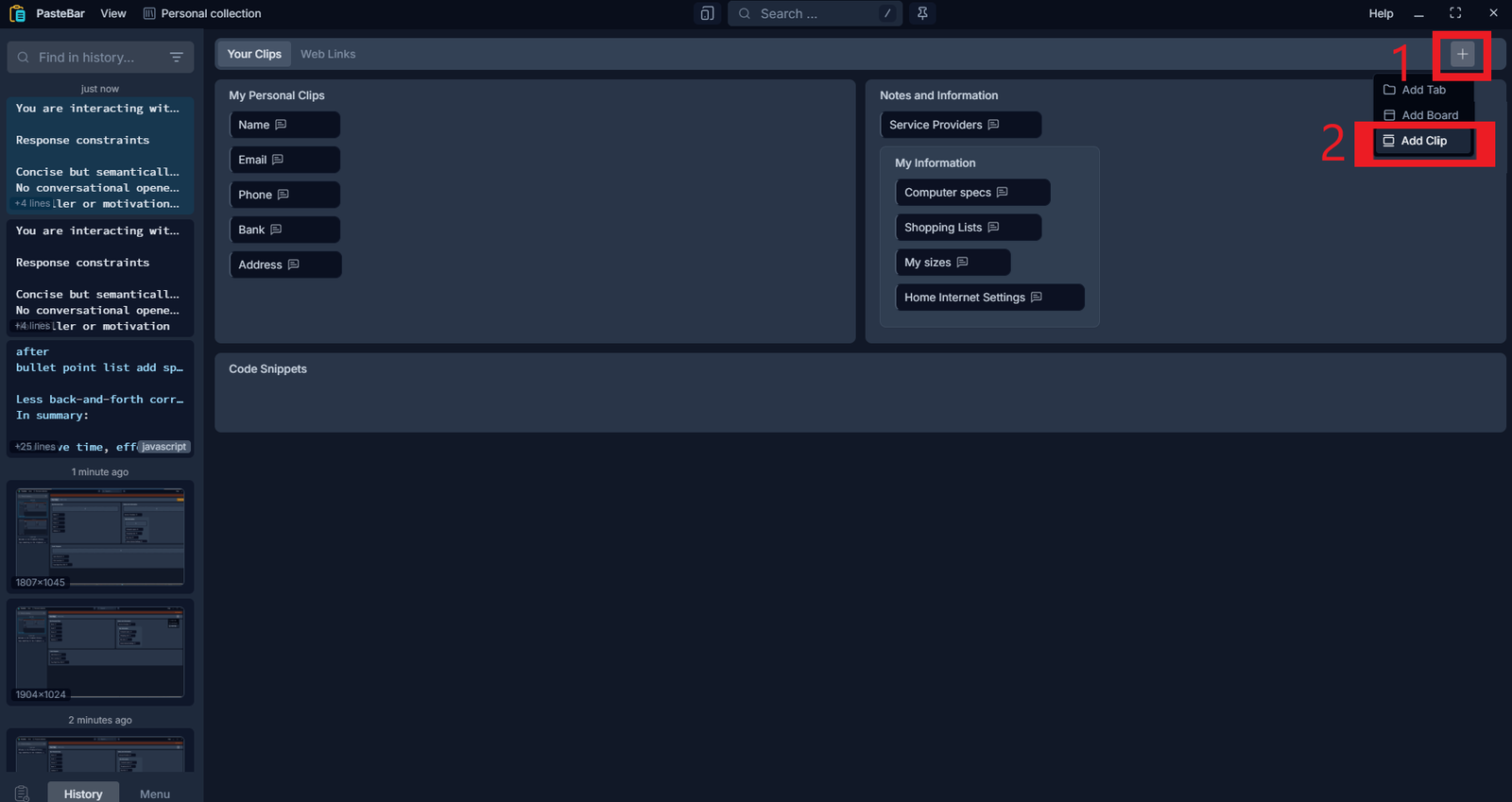
- Click the + icon in the top-right corner.
- Select Add Clip.
Step 2 — Create Your Prompt Snippet

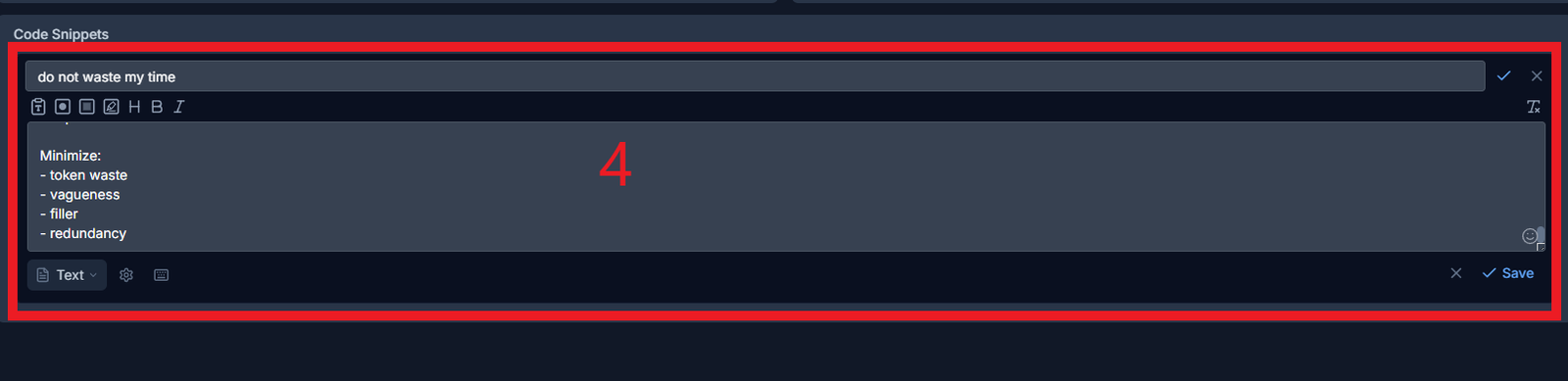
Inside the editor:
- Give your snippet a recognizable name.
- Paste your prompt into the main text area.
- Click Save.
This allows you to build a personal library of reusable prompts,
instructions, frameworks, and AI workflows.
Step 3 — Quickly Paste Your Saved Prompt Anywhere
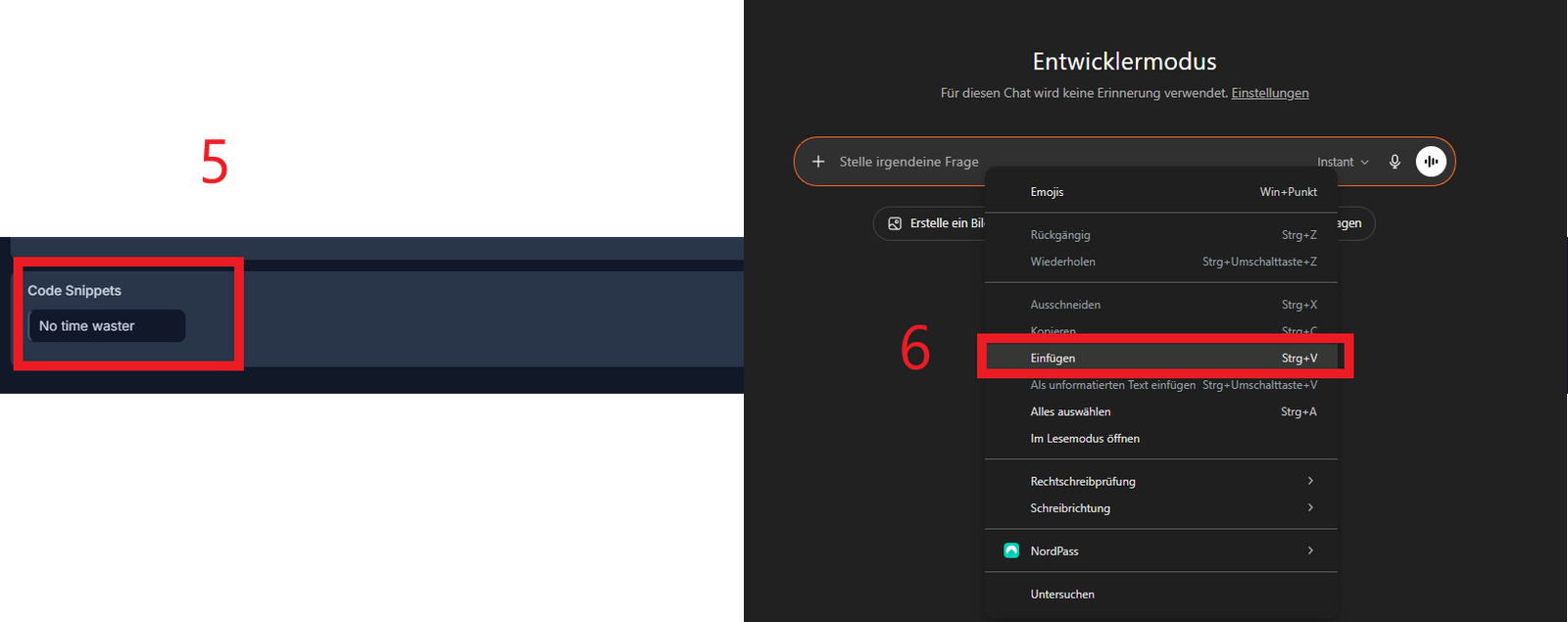
- Open any text field.
- Right-click.
- Select Paste (or use
Ctrl + V/Cmd + V).
Your saved prompt will instantly appear, allowing you to reuse high-quality prompts
in seconds instead of rewriting them every time.
No Time Waster Prompt Template
There are thousands of prompt templates online, but one framework we use constantly — and want to share with you — is the No Time Waster Prompt.
The goal of this prompt is simple:
generate higher-quality AI responses with less filler, less vagueness, and significantly better implementation value.
Get it on your email: